The framework
PascalGPT is a powerful, lightweight, Delphi-native – FPC compatible, open-source framework for creating, training, and experimenting with GPT-style transformer models, written entirely in Object Pascal. Its goal is to bring modern large language models into the Pascal ecosystem, without requiring Python or external ML runtimes.
Since the first internal versions, the project has evolved into a real end-to-end framework: from tokenization and dataset preparation, through training and evaluation, to exporting models in industry-standard formats like SafeTensors and integration with vector databases such as ChromaDB.
I asked Google’s NotebookLM to make a video about we are talking:
Why PascalGPT?
If you are a Delphi or Free Pascal developer, you usually have two choices when working with LLMs:
- Call a remote API and accept the “black box”.
- Or dive into a Python-only ecosystem and change stacks.
PascalGPT offers a third path:
- Everything is Object Pascal – from tokenizer to transformer layers.
- Full control and transparency – you can open the units, read the code, and modify every step of the pipeline.
- No external ML runtime – the framework uses the high-performance numerical capabilities of MrMath for CPU work, plus optional CUDA acceleration for GPUs.
Core Architecture at a Glance
Native NLP Pipeline
PascalGPT implements the full text-to-tensor pipeline:
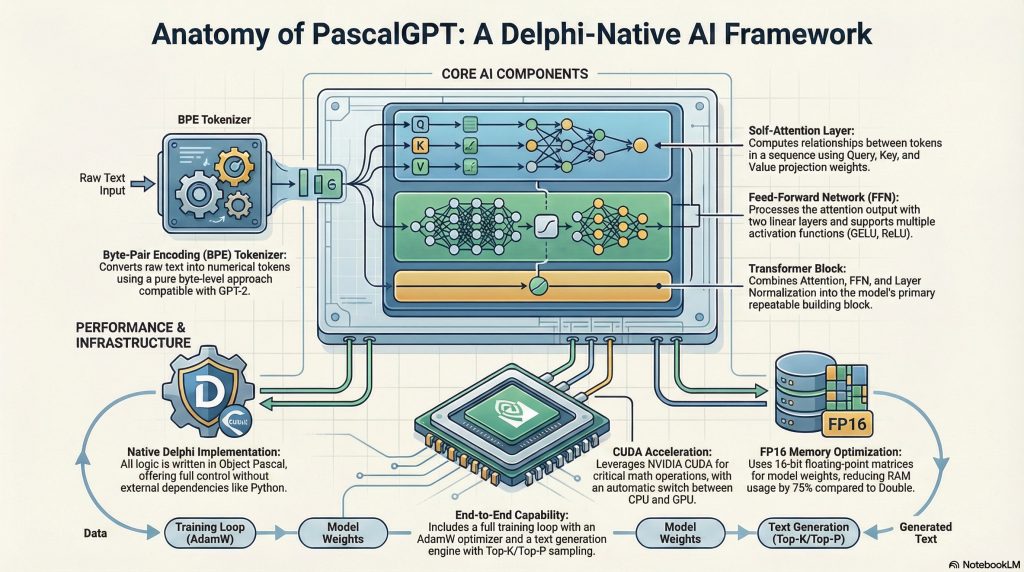
- Byte Pair Encoding (BPE)
Implemented viaPascalGPT.BPETokenizerandPascalGPT.BPEStorage, with:- Byte-level BPE support (https://huggingface.co/learn/llm-course/chapter6/5).
- Deterministic training and encoding.
- Export of
vocab.jsonandmerges.txtin Hugging Face–compatible format.
- Token Embeddings
TheTPascalGPTEmbeddingsclass:- Maps token IDs to dense vectors.
- Uses Xavier/Glorot initialization for stable training.
- Adds sinusoidal positional encodings so the model can understand sequence order.
- Dataset and Utilities
Units likePascalGPT.DatasetandPascalGPT.DatasetUtilshelp:- Prepare training/validation splits.
- Sanitize and truncate sequences to a chosen max length.
- Build mini-batches compatible with the model configuration.
Transformer Components (All in Pascal)
PascalGPT implements every major piece of a GPT-style transformer as separate units:
- Attention Layer –
PascalGPT.Attention- Multi-head self-attention.
- Query/Key/Value projections (
FQueryWeights,FKeyWeights,FValueWeights). - Softmax with causal masking, so the model only sees past tokens.
- Feed-Forward Network –
PascalGPT.FeedForward- Two-layer MLP with support for ReLU, GELU, or Swish.
- Full forward and backward paths for gradient-based training.
- Layer Normalization, Residuals & Blocks –
PascalGPT.TransformerBlock- Combines attention, layer norm, residual connections, and feed-forward in a single reusable block.
- Multiple blocks are stacked in
PascalGPT.Modelto build deeper architectures.
The result is a clean, modular structure: you can inspect or change one layer at a time without touching the rest of the codebase.
End-to-End Training Pipeline
PascalGPT is not just a collection of math routines; it includes a full training workflow.
JSON-Based Configuration
Training and model hyperparameters are now loaded from a JSON configuration file, using helper units like PascalGPT.Helper.Configuration. Typical settings include:
- Model size (embed dim, number of layers, heads, hidden size).
- Training parameters (epochs, batch size, learning rate, weight decay, gradient clipping).
- Tokenizer and dataset options (max sequence length, vocab size, validation split).
This makes experiments reproducible: you can save, version, and share your presets in the /TrainingPresets folder.
Demo Training Application
A demo program (inside /Demos) walks through the full pipeline:
- Corpus Preparation – Load and clean your text data (e.g. documentation, articles, Wikipedia-like sources).
- BPE Training – Train a tokenizer, inspect vocabulary size and merge counts.
- Dataset Construction – Split into train/validation sets, build token sequences, handle variable lengths.
- Intermediate Checks – Test tokenization and detokenization round-trip.
- Run forward passes on small sequences to validate shapes and dims.
- Validate attention and transformer blocks.
- Model Training – Run multiple epochs with logging of loss and basic statistics.
- Optionally apply learning rate decay and weight decay.
- Periodically save model checkpoints.
This demo shows PascalGPT as a real training framework, not just a manual forward-pass toy.
FP16 Weights and Memory Optimization
Modern transformer models are memory-hungry. To address this, PascalGPT introduces a dedicated FP16 matrix type:
TFP16Matrix(FP16Matrix)- Designed primarily for weight storage (embeddings, attention, feed-forward weights).
- Bridges to and from
TDoubleMatrixso you can:- Train in double precision when needed.
- Store large weights in half precision to reduce RAM usage by up to 75% compared to
Double.
This allows you to:
- Load larger models on the same machine.
- Export lighter SafeTensors files.
- Move more efficiently between CPU and GPU memory.
The training code can still perform computations in higher precision while keeping long-term weights compressed.
CUDA Acceleration with PascalGPT.CUDA
While everything runs on CPU via MrMath, PascalGPT also includes experimental GPU acceleration:
- CUDA Integration – Units like
PascalGPT.CUDA,PascalGPT.CUDA.MathandPascalGPT.CUDA.Kernels:- Provide kernels for high-throughput matrix multiplication (GEMM).
- Implement numerically stable Softmax for attention.
- Offer helpers for bias addition and elementwise operations.
- Hybrid Execution
The framework is designed so that:- Small matrices can stay on CPU (lower overhead).
- Larger operations are offloaded to the GPU when beneficial.
- CPU remains the fallback, so CUDA is optional, not mandatory.
This makes PascalGPT suitable both for computers without a GPU and for more powerful desktops with NVIDIA cards.
NOTE: Training GPT-style models is inherently computationally very intensive. Depending on the size of your dataset and the performance of your hardware, the process may take several hours or even days.
Model Export: SafeTensors and Interop
PascalGPT models can be exported using the SafeTensors format (https://huggingface.co/docs/safetensors/index), via the PascalGPT.Model unit:
- Each tensor is saved with:
- Name (e.g.
model.embed_tokens.weight,model.lm_head.weight). - Shape (dimensions).
- Data type (e.g. F32, F16, BF16, integers, bool).
- Role metadata for easier inspection.
- Name (e.g.
- SafeTensors files can be:
- Loaded in Python for analysis or conversion.
- Shared between Pascal and non-Pascal environments.
Additionally, the framework supports:
- Hugging Face–style tokenizer export
vocab.jsonmerges.txt
- Embeddings export to NumPy (
.npy)- For visualization in tools like Matplotlib.
- For use in external data science workflows.
Vector Search and RAG with ChromaDB
Beyond pure language modeling, PascalGPT integrates with ChromaDB, a popular open-source vector database:
- The
PascalGPT.ChromaDBunit:- Handles the embeddings using PascalGPT’s own model or other embedding backends.
- Stores embeddings either:
- In a ChromaDB instance, or
- In a default SQLite database for local experiments.
This forms the basis of RAG (Retrieval-Augmented Generation) in Object Pascal:
- Index your documents as vectors.
- At query time, search the most similar chunks.
- Feed them into a PascalGPT-based model or another LLM endpoint to generate grounded answers.
All of this can be orchestrated from a Delphi/FPC application, without leaving your ecosystem.
Cross-Platform and Tooling
PascalGPT is written in pure Object Pascal, making it:
- Delphi and FPC compatible – suitable for Windows, Linux, and macOS builds.
- Suitable for:
- Local desktop tools.
- Backend services and REST APIs.
- Research scripts and utilities.
Project layout (high-level):
/Lib– Core PascalGPT units (Model, Attention, Embeddings, Training, CUDA, etc.)./Demos– Example projects and training demos./Cuda– CUDA kernels and helper scripts for compilation./Python– Small helper scripts for.npyor SafeTensors inspection (optional)./TrainingPresets– JSON preset files for model/training configuration.
Dependencies
- MrMath – Required numerical library for matrices and linear algebra.
- FastMM (optional but recommended) – Helpful for:
- Detecting and tracking memory leaks during development.
- More detailed memory usage diagnostics.
Who Is PascalGPT For?
PascalGPT is aimed at:
- Delphi/FPC developers who want to understand and build LLMs without switching to Python.
- Researchers and tinkerers who enjoy having full source code access to all model components.
- Product developers who want:
- Offline-capable assistants.
- Strong control over data and deployment.
- The ability to integrate transformers directly into existing Object Pascal systems.
Whether you’re just curious about how transformers work or planning to ship real AI-powered features, PascalGPT is a solid starting point in the Pascal world.
Roadmap and Next Steps
The project continues to evolve. Planned and ongoing directions include:
- Expanding and optimizing CUDA kernels (especially for multi-head attention).
- More robust mixed-precision flows (FP16/BF16 training and inference).
- Additional demos:
- RAG-style question answering.
- Simple chat UIs built over PascalGPT models.
- Better import utilities for external models (e.g. converting from existing Hugging Face checkpoints into PascalGPT).
Conclusion
PascalGPT shows that modern deep learning is absolutely possible in Object Pascal. With a modular architecture, BPE tokenizer, transformer stack, FP16 support, CUDA acceleration, SafeTensors export, and ChromaDB integration, it’s no longer just an experiment: it’s a practical framework you can use, study, and extend.
If you’re a Pascal developer and always felt that LLMs were “somewhere else,” PascalGPT brings them into your IDE, under your control.
Where to get it?
PascalGPT will be available at github very soon! Keep in touch!